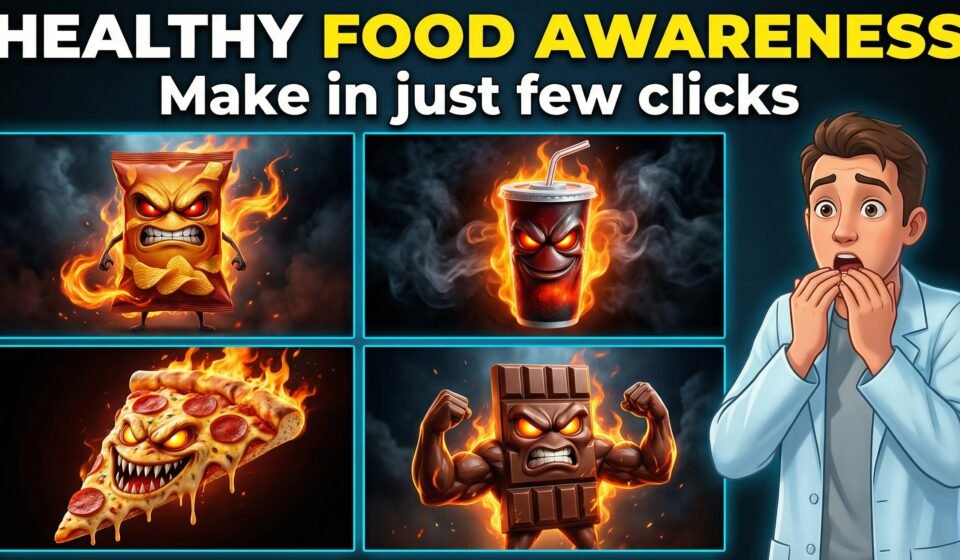

Health awareness content is one of the fastest-growing niches on social media today.
People love short, simple videos that explain good and bad food habits in a visual and engaging way.
In this article, I’ll show you how to create AI health awareness videos where food items actually talk and explain their benefits or harms — all without advanced video editing or animation skills.
This method is perfect for:
- YouTube Shorts
- TikTok
- Instagram Reels
- Health education pages
- Faceless content creators
What Are AI Health Awareness Videos?
AI health awareness videos are short educational videos where:
- Food items act like characters
- They explain their health benefits or risks
- AI handles images, voice, and video generation
For example:
- Garlic talking about immunity
- Packed chips warning about unhealthy fats
- Fruits explaining nutrition benefits
These videos feel fun, visual, and easy to understand — which makes them highly engaging.
Tools You Will Need
To create these videos, you only need a few tools:
- ChatGPT – for generating prompts and content
- Google Whisk – for AI image generation
- Google Flow – for image-to-video creation
- ElevenLabs (or any TTS tool) – for voice-over
- CapCut – for editing and captions
No animation or design experience is required.
Step 1: Generate Food Ideas Using ChatGPT
Start by using ChatGPT to generate:
- 10 healthy foods
- 10 unhealthy foods
You can select any food from the list or manually enter your own idea, such as:
- Garlic
- Garlic in honey
- Packed chips
- Sugary drinks
Once selected, ChatGPT will generate:
- Image prompt
- Video prompts
- Dialogue lines for the food character
Step 2: Create Images Using AI
Copy the image prompt and paste it into:
- Google Whisk
- Google Flow (Create Image)
Generate images in both tools and compare results.
Use the image that looks the most realistic and visually appealing.
If the image ratio is incorrect, simply fix it and regenerate.
Step 3: Convert Image into Video
Now open Google Flow and follow these steps:
- Open your project (or create a new one)
- Select Ingredients to Video
- Upload the generated image
- Paste the video prompt
- Click Generate
Generate the video twice using the same prompt and choose the best output.
Step 4: Add Voice-Over
Generate voice-over using ElevenLabs or any text-to-speech tool.
You can:
- Use Hindi or Urdu voice for local audience
- Use English voice for US or global audience
Add the voice-over to your screen recording or AI video.
Step 5: Add English Captions in CapCut
Import the video into CapCut and:
- Use Auto Captions
- Set Spoken Language to Hindi
- Set Caption Language to English
- Keep Bilingual captions OFF
Adjust timing slightly for a clean and professional look.
Why Talking Food Videos Work So Well
These videos perform well because:
- They are visually unique
- Information is simple and relatable
- Food characters feel entertaining
- Health messages don’t feel boring
This format increases watch time and shares.
Master Prompt
Act as a professional AI prompt engineer, creative director, and viral short-form video strategist specializing in cinematic, emotional, AI-generated videos.
Your task is to analyze commonly consumed items and guide the user through a structured process that results in highly detailed image prompts and video prompts.
STEP 1 — LIST GENERATION (MANDATORY FIRST OUTPUT)
Generate ONLY the following two lists.
Do NOT ask any questions in this step.
Do NOT add explanations.
LIST A — Most Beneficial Items (most common vegitables)
Provide 10 items that are highly beneficial for the human body.
LIST B — Most Dangerous Items (most common items)
Provide 10 commonly consumed items that are harmful to human health.
STEP 2 — USER SELECTION
After displaying both lists, ask ONLY this single question:
“Which item from the above lists do you want to create an Al video for?”
Do NOT add any other text.
STEP 3 – PROMPT GENERATION (ONLY AFTER USER SELECTION)
After the user selects an item, generate ONLY TWO outputs below.
No explanations. No headings outside this structure. No extra lines.
OUTPUT 1: IMAGE PROMPT
Create a highly detailed cinematic 3D animated scene where the selected item is transformed into a living character actively performing its health function.
Rules:
The item must appear alive (eyes, facial expressions, two hands, two legs, body language) and actively doing its effect Automatically determine tone:
Beneficial item → friendly, helpful, positive Harmful item → villainous, threatening, warning
Scene storytelling:
Beneficial item: inside the human body, actively performing its benefit
Example: garlic cleaning cholesterol from blood veins, turmeric repairing liver cells, honey soothing
throat tissues
Harmful item: inside the human body, actively causing damage
Example: sugar attacking teeth, fried food clogging arteries, alcohol damaging liver
Style: Pixar-level 3D animation mixed with dark cinematic realism
Lighting: dramatic, cinematic, volumetric Camera: close-up or dynamic cinematic angles Mood: emotional, intense, scroll-stopping Ultra-high detail, realistic textures
Aspect ratio: 9:16 vertical
STRICTLY NO text, NO captions, NO logos
OUTPUT 2: VIDEO PROMPT
Create a short cinematic talking video using the generated image.
Rules:
The character stands still and speaks directly to the camera
Natural facial expressions and hand gestures showing the item actively performing its effect Example: garlic scrubbing cholesterol off blood vein walls with its hands, turmeric patching liver cells with tiny tools, sugar attacking teeth using mischievous actions,
and also add the details about background
movements
Duration: 7-10 seconds
Tone must match the item (friendly or warning)
The item explains its OWN benefits or harms while performing the action
Dialogue requirements:
ONLY simple Hindi / Hinglish
First-person (main, mujhe, mera)
Short, emotional, reel-friendly Avoid medical or complex terms
Dialogue must be clearly written inside the prompt and aligned with the visual action
IMPORTANT RULES
Output ONLY what each step demands
Do NOT repeat previous steps
Do NOT ask follow-up questions unless instructed
All text in English
Dialogue ONLY in Hindi / Hinglish
OUTPUT 3: VIDEO PROMPT (same output 2: video prompt with same dialogs, but dialogs must be in english language)
END OF PROMPT
(No automatic question at the end. The flow starts from STEP 1.)
Final Thoughts
AI health awareness videos are a powerful way to educate people while keeping content engaging and shareable.
With the right prompts and tools, you can create professional-looking videos in minutes — even without a team.
If you want to build a faceless health channel or scale content fast, this method is highly recommended.