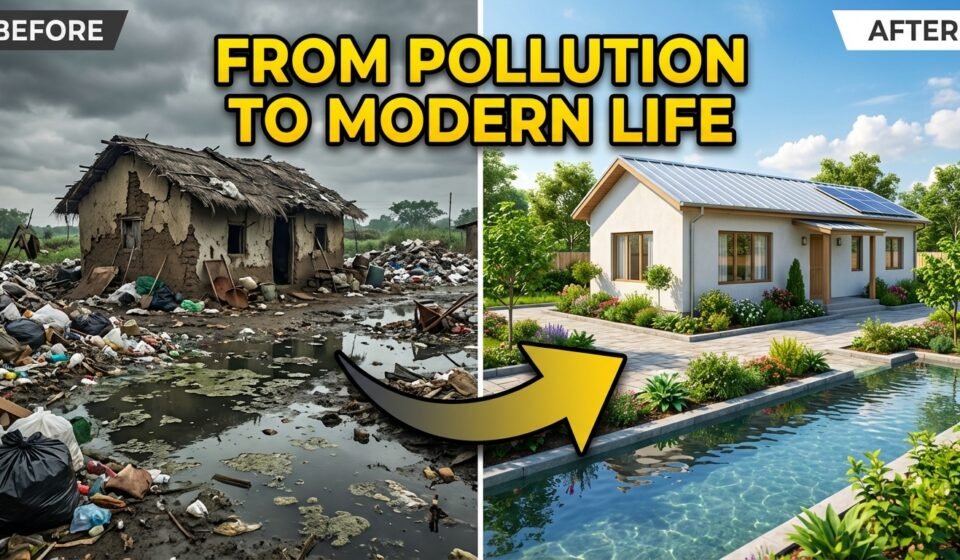

In recent times, cinematic AI timelapse videos showing polluted and neglected environments transforming over time have gained massive attention online. These videos are highly engaging, emotional, and visually powerful.
In this article, I will show you exactly how to generate these types of AI videos step by step.
You will also get the exact prompts that you can copy and use to create your own cinematic AI images and timelapse videos.
No advanced editing skills are required.
Step 1: Generate Polluted Location Ideas
The first step is to create realistic location ideas that represent extremely polluted, dirty, and neglected environments. These locations will be used as the base for image and video generation.
Use the following prompt in ChatGPT or any AI text tool:
🔹 PROMPT 1 — Polluted Location Generator
Act as a realistic environmental location concept generator.
Your task is to generate 10 unique location ideas inspired by extremely dirty, polluted, garbage-filled, and neglected environments.
IMPORTANT RULES:
- Each idea must be set in a different geographical environment such as mountains, hills, riverbanks, canals, coastal areas, forests, urban outskirts, industrial zones, or rural settlements.
• Each idea must describe a heavily polluted and garbage-filled location.
• Clearly describe visible dirt elements such as trash piles, sewage water, broken houses, muddy pathways, smoke pollution, plastic waste, contaminated water, or destroyed surroundings.
• Focus only on describing the current dirty and polluted condition of the location.
• Do NOT mention cleaning, improvement, beauty, transformation, or future development in any way.
OUTPUT FORMAT RULES: - Generate exactly 10 ideas.
• Each idea must be 4 to 6 lines long.
• Each idea must clearly mention the type of area (mountain, hill, river, canal, etc.).
• Use highly visual and realistic descriptive language suitable for cinematic AI image or video generation.
Once you generate the locations, select one location that feels the most realistic and visually powerful.
Step 2: Create Cinematic AI Image & Video Prompts
After selecting a location, the next step is to convert that location into cinematic photo stages and video timelapse prompts.
Use the prompt below and paste your selected location idea where mentioned.
PROMPT 2 — Cinematic AI Image & Timelapse Generator
Act as a professional cinematic AI image and video prompt engineer specializing in environmental timelapse transformation storytelling.
Your task is to generate 6 highly detailed cinematic prompts based on the location description provided below.
LOCATION DESCRIPTION:
[PASTE LOCATION IDEA HERE]
IMPORTANT RULES:
Location description must appear naturally in all prompts.
Maintain strong visual consistency across all stages.
Environment, terrain, and geographical features must remain the same in every stage.
Prompts must feel hyper-realistic, cinematic, and suitable for AI image and video generation.
Camera angles for photos and video must remain straight + slightly elevated.
Clearly separate Photo prompts and Video prompts.
Video transitions must be continuous timelapse, no abrupt cuts.
Each timelapse video should last 8 seconds.
PHOTO PROMPTS STRUCTURE
PHOTO 1 — INITIAL STAGE (DAY, SLUM)
- Severely damaged terrain
- Heavy garbage and pollution
- Broken houses and contaminated water
- Construction workers and machinery
- Harsh midday lighting
- Mood: chaotic and neglected
PHOTO 2 — MIDDLE STAGE (GOLDEN HOUR)
- Same location during development phase
- Partially repaired roads
- Workers actively building
- Warm golden hour lighting
- Mood: transitional and hopeful
PHOTO 3 — FINAL STAGE (NIGHT, MODERN)
- Fully modernized and clean environment
- LED streetlights and organized infrastructure
- Modern houses and calm night mood
- No workers or machinery
VIDEO PROMPTS STRUCTURE
VIDEO 1 — Timelapse (Initial → Middle)
- Continuous timelapse
- Garbage gradually disappearing
- Roads rebuilding step by step
- Lighting transitions from day to sunset
VIDEO 2 — Timelapse (Middle → Final)
- Infrastructure appearing gradually
- Workers fading out
- Streetlights turning on
- Smooth sunset to night transition
VIDEO 3 — Final Drone Orbit
- Slow cinematic orbit
- Focus on modern houses
- Calm and aesthetic environment
Step 3: Generate Images and Videos
- Generate images for each photo stage using an AI image tool
- Convert each image into video using an image-to-video AI tool
- Combine all video clips into one final cinematic sequence
Step 4: Publish and Optimize
These videos perform best when:
- Uploaded as short cinematic videos
- Used with timelapse hooks
- Paired with emotional or documentary-style captions
Final Thoughts
This method allows you to create powerful cinematic AI videos that tell a strong environmental story using only prompts. With the right locations and visual consistency, these videos can gain high engagement across social media platforms.
Feel free to experiment with different environments and visual moods.